For teachers who run their room by the clock

The classroom timer that doesn’t drift — even when your laptop sleeps.

Set it to end at 9:02, and it ends at 9:02. LessonTimer stores your class times as clock times, not a stopwatch — so closing the lid between periods never costs you ten minutes you didn’t notice.

Linux, Windows & macOS · in classroom testing now
Or email [email protected] directly
—:—— —M Next: nothing else scheduled
P1 — Class time
—:——
 
Live demo · counting down to the next real clock minute, right now, in your own timezone
The bug that started this

Most timers count seconds. Yours needs to count minutes on a clock.

A stopwatch-style timer

  1. 8:18 44‑minute timer starts for class
  2. 8:40 Laptop lid closes between tasks
  3. 8:50 Lid reopens — the OS suspended the clock the timer was counting from
  4. 9:12 Timer finally ends — ten minutes into the next thing you had planned

LessonTimer

  1. 8:18 Entry set to end at 9:02 — a clock time, not a duration
  2. 8:40 Laptop lid closes
  3. 8:50 Lid reopens — LessonTimer recalculates from the wall clock, not from where it left off
  4. 9:02 Ends exactly on time, as if it never slept
The actual app

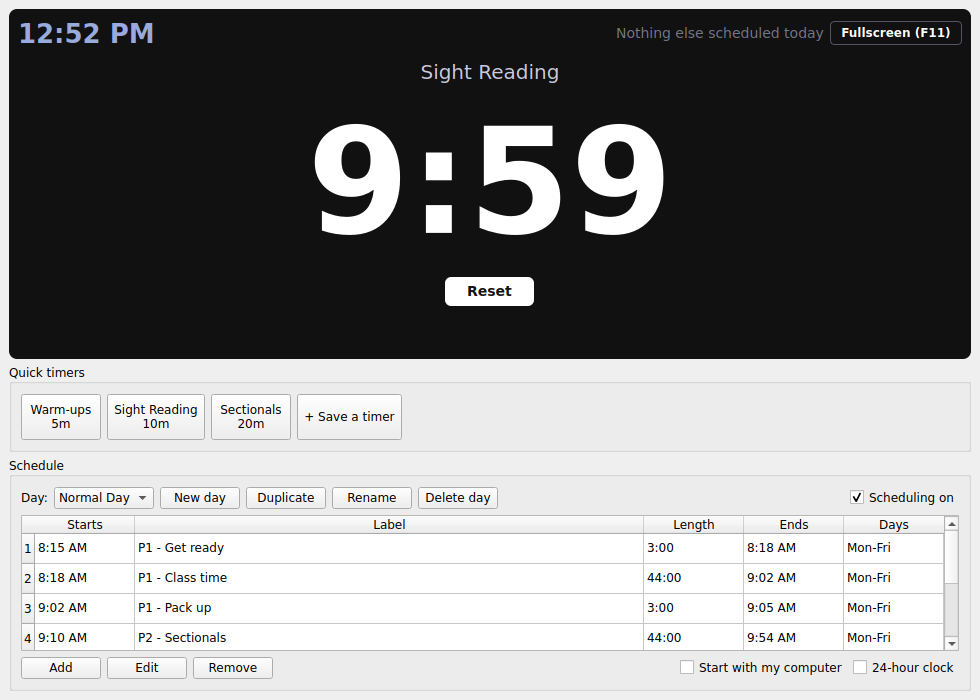
Not a mockup — this is what's running right now

LessonTimer main window showing a running countdown, quick timers, and a class schedule table
Main window. A running timer, saved quick timers below it, and the day's schedule — each row a real class period with a start time, length and end time worked out for you.
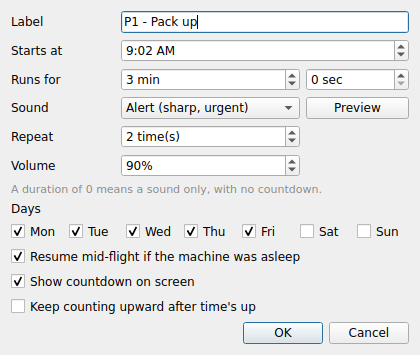
LessonTimer schedule entry editor showing sound, repeat, volume and cue point settings
Editing a period. Pick the sound, how many times it repeats, how loud it is — live preview before you save.
What's actually in it

Built around how a teaching day really runs

01

Day profiles

Monday's schedule isn't Wednesday's. Save as many day profiles as your week needs and switch with one click.

02

Cue points inside one timer

A 50‑minute block with a warning at 4 minutes and another at 47 — one timer, several alerts, no extra setup.

03

Sound that cuts through the room

Five distinct cues plus your own recording, each with its own repeat count and volume — so “class starts” never sounds like “pack up.”

04

Readable from the back row

Fullscreen projection mode holds digit height to a quarter of the screen, with the terminal moment flashed, not just chimed.

Built for a choir teacher who needed to stop class at a clock time three minutes before the bell — reliably, in a room too loud to notice a timer that had quietly drifted.

Currently in classroom testing with music teachers — not yet a public release
Cost

Free during testing. Priced simply after.

LessonTimer is free for every teacher testing it before the public release. Individual pricing for the public release hasn't been set yet — it'll be a single per‑teacher price, not a subscription tier ladder. If you're testing it now, it stays free for you.

Teaching on a schedule that can't slip?

LessonTimer is in early testing with a small group of teachers. If you want in before the public release, send a note — free for testers.

Or email [email protected] directly